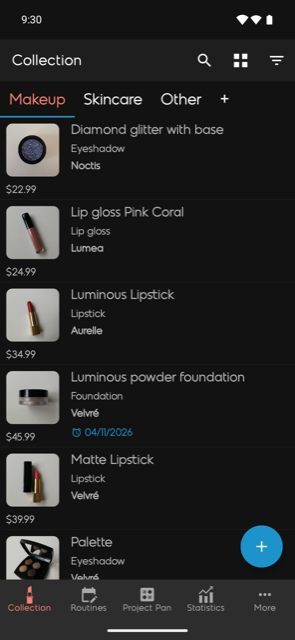
Beautistics is a personal beauty inventory app that helps you catalog products, track usage, build routines, and understand your spending. It's available on iOS, Android, and the web, and everything syncs through your account.
You can sign in with your Google account on all platforms. On iOS and the web, Apple Sign-In is also available. Your data syncs across all devices as long as you use the same account.
Yes. Beautistics is free to use, with limits on how much you can store. Premium removes them. The free allowances are:
| Free plan | iOS | Android | Web |
|---|---|---|---|
| Products in your collection | 30 | 30 | 40 |
| AI photo scans per month | 50 | 50 | — |
| Routines | 5 | 5 | view only |
| Lookbook entries | 10 | 10 | view only |
| Project Pans | 1 | 2 | view only |
| Items per Project Pan | 10 | 10 | view only |
Your collection is shared across every platform, so a product added on your phone counts towards the limit on the web too.
The web app is built for the jobs that are easier with a keyboard: adding and editing products in bulk, spreadsheet import and export, and browsing your statistics. Routines, Lookbook, and Project Pan are view-only on the web — create and edit those in the iOS or Android app.
In the mobile apps, open Collection and tap the + button in the bottom-right corner. On the web, click + Add at the top of the Products page. Only the name is required — fill in as much or as little as you like, and edit it later at any time.
Products sit in categories, shown as tabs along the top (Makeup, Skincare and Other to begin with). Tap + on the tab bar to add your own, and give each product a subcategory for finer grouping, such as Skincare → Face cream.
From the same screen you can search, filter, switch between grid and list layouts, and sort by name, brand, price, rating, date or expiry.
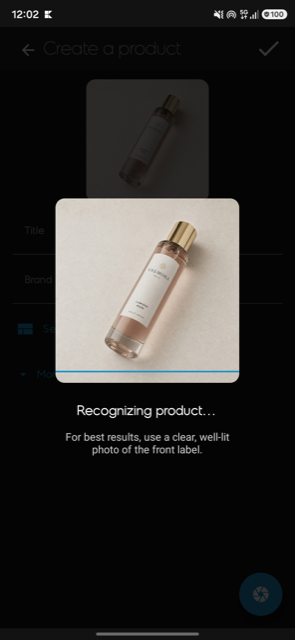
Yes. When adding a product, you can take or choose a photo and let Beautistics suggest the name, brand, and category for you using AI. Review the suggestions, edit anything that isn't quite right, and save. It's an optional shortcut — you can always fill everything in manually instead.
Once a product has an opened date and a PAO, Beautistics works out when it expires and warns you before it does.
On the web, you can switch between Gallery (visual cards) and Spreadsheet (table with inline editing). The spreadsheet lets you quickly scan, sort, and edit many products at once.
Open the product and use the Move to Wishlist or Mark as Finished action. Wishlist items are things you intend to buy; archive items are products you've used up.
The Wishlist is a separate collection for products you're considering purchasing. When you buy one, move it to your main collection — all details carry over.
When you finish a product, mark it as done. It moves to the Archive with its completion date. Archived items still appear in statistics so your spending history stays accurate.
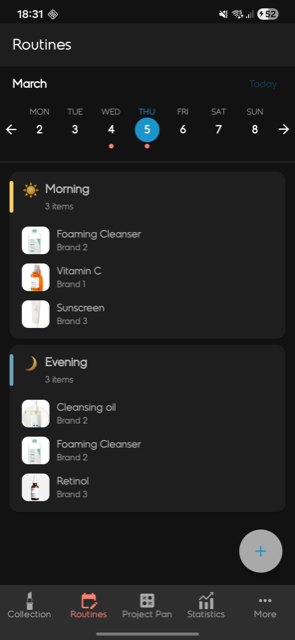
Create morning, evening, or custom routines and link products from your collection to each one. Set which days a routine repeats and optionally enable reminders. Completing a routine can log a use against every product in it, so your usage counts stay accurate without extra tapping.
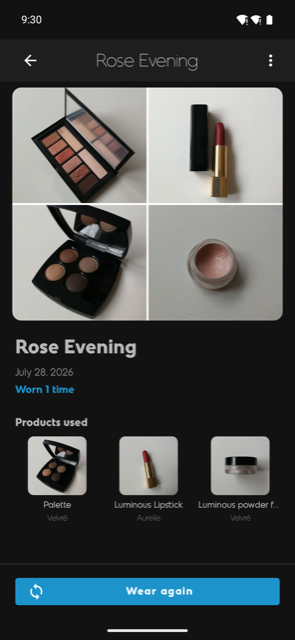
The Lookbook is your private record of finished looks. Save a look with photos, give it a name and date, and link the products you used, so you can recreate it later or remember which combination actually worked.
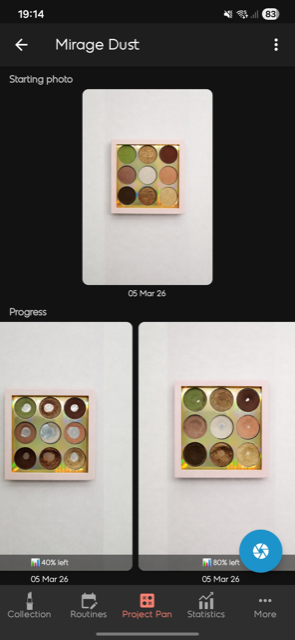
Project Pan helps you commit to using specific products until they're completely finished. Create a project, add items, and track progress over time.
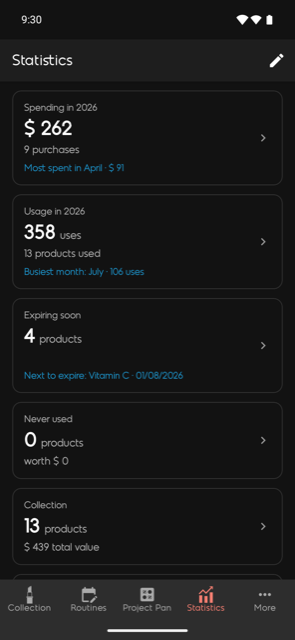
Statistics is a dashboard of cards, each answering one question about your collection. Pick a year at the top, and tap any card to see the full list behind it.
Use the edit button in the corner to reorder the cards or hide the ones you don't care about.
Set a monthly, quarterly, or yearly spending limit. Beautistics works out how much you've spent from the purchase dates in your collection and shows a progress bar that changes colour as you approach the limit.
Already tracking your collection in a spreadsheet? Use Import in the web app's sidebar to bring it in, and Export to get it back out at any time.
Import accepts .xlsx, .xls, .ods and .csv files, including anything exported from Google Sheets. The wizard walks you through four steps:
A few things it handles for you:
12.50, 12,50 or 1 500 ₽ all work — and star ratings like ★★★★ are understoodImport adds products, it never updates existing ones, so importing the same file twice will give you duplicates.
Export produces an .xlsx workbook of your whole collection, organised either by status (products, wishlist, finished) or with one sheet per category. It can be re-imported later, so it doubles as a backup.
Premium is an optional subscription that removes every limit in the table above:
Subscriptions are managed through the Apple App Store (iOS) or Google Play (Android). You can cancel anytime in your device's subscription settings. On the web, premium status is shared via your account.
Yes. As long as you sign in with the same Google or Apple account, your collection, routines, Lookbook and Project Pans sync across iOS, Android, and the web.
Budgets are stored on the device rather than in your account, so each phone or tablet keeps its own. That's why the web app doesn't show them. Your products, and everything calculated from them, do sync.
They're designed around the camera and daily use on a phone, so for now the web shows them but doesn't let you edit them. Everything you create in the app appears there automatically.
The iOS and Android apps work offline for browsing your collection. Changes sync automatically when you reconnect.
You can request full account deletion by emailing beautistics@outlook.com or visiting our Data Deletion page. On iOS, the option is also available in Settings.
On iOS, go to Settings → Restore Purchases. On Android, premium status is restored automatically when you sign in with the same account used for the purchase.
We'd love to hear from you! Email us at beautistics@outlook.com or reach out on Instagram or Reddit.
Beautistics stores colour as a swatch you pick, rather than as text, so there's no field for a written shade name yet. If you'd like to keep that text, map the column to Notes or Tags on the mapping step of the import wizard.
Rows without a product name are skipped — the preview step tells you how many. Otherwise you may have reached the free-tier limit; the result screen says so if that's what happened.
You keep all your data. If you exceed the free-tier limits, you can still view everything but won't be able to add new items until you're back within the limits or re-subscribe.
When you choose to scan a product, the single image you provide is sent to Google's Gemini AI, which returns suggested details (name, brand, category) for you to review. The image is processed only to generate that result — it isn't used to train Google's AI models, and Beautistics doesn't keep a separate copy of it on our servers. A photo is only saved if you choose to attach it to the product. Please only scan products you own and avoid including other people's personal information in the photo. See our Privacy Policy for full details.
AI suggestions are a convenience and can sometimes be inaccurate or incomplete. Just edit any field before saving, the same way you would when adding a product manually. Nothing is saved until you confirm.
Free accounts have 50 AI scans per month, which reset on the 1st of each month. Beautistics Premium provides a much higher allowance, subject to fair use. You can always add products manually without using AI.
If you need further help, email beautistics@outlook.com.